
To host workloads that aren't your own, you'll first need a machine built to run many of them at once, and that starts with the hardware underneath.
Understand Why a Server Beats a Home PC
An enterprise server and a home PC can share the same CPU family and still be built for completely different lives. A used enterprise machine was designed to sit in a rack and run three shifts a day for years without anyone touching it: redundant power supplies so one failure doesn't take it down, ECC memory that corrects the odd bit-flip instead of quietly corrupting data, hot-swap drive bays, and a remote management port (iLO on HPE, iDRAC on Dell, IPMI as the generic name) that lets you reboot it or watch its boot screen from another country. A home PC was designed to sit under a desk and get turned off at night.
Isn't a beefy desktop tower basically the same thing once you add enough RAM?
Not for long. Once real workloads start stacking up, a desktop's cooling and power design work against it: consumer CPUs throttle under sustained all-core load because they were never meant to hold peak output for days, a single power supply means one fault takes the whole platform offline, and without remote management a hung machine means physically walking over to it. A rack server carries the same specs into a chassis built to hold them for years, which is exactly what a platform other people depend on needs.
Plan for Noise and Power at Home
The same redundancy that makes a server reliable also makes it loud: dense hot-swap fans built to move enough air past two CPUs under full load sound closer to a vacuum cleaner than a desktop, since the chassis was designed to run in a server room, out of anyone's earshot.
Is that fan noise something you're stuck with once the server is running?
Not entirely. iDRAC and iLO both expose manual fan control, and pulling the fans out of their automatic curve cuts the noise noticeably at idle or light load. Push it too far under real load, though, and the CPUs throttle to protect themselves, which caps how quiet manual control can actually make a rack server.
Power draw is the other planning question, and it's smaller than the PSU rating on the spec sheet suggests: a 1U dual-Xeon server like the ones above typically pulls around 150W at normal, everyday load, well under the 495W a single hot-swap PSU is rated to supply at peak. Running that continuously for a month still adds a real line to a home electricity bill, which is worth checking before deciding between running it at home or renting space in a colocation rack.
Prioritize Threads for a VM Hosting Workload
Every VM the hypervisor runs gets a number of virtual CPUs, and those vCPUs have to land somewhere on the host's real, physical threads. A modern server CPU exposes two logical threads per physical core through simultaneous multithreading, so a dual-socket board with two 16-core CPUs offers 64 threads in total, double the physical core count. For a platform built to host several VMs side by side, that thread count matters more than almost anything else on the spec sheet.
Why threads over raw clock speed? Because a hosting platform rarely runs one demanding task at full tilt; it runs many modest, bursty ones at the same time, each wanting its own slice of CPU right now rather than a faster slice later. Stack enough VMs onto too few threads and they start queuing for CPU time behind each other, a problem known as noisy-neighbor contention: one VM's spike in load slows down every other VM sharing its threads. More threads mean more VMs can get real, uncontended CPU time simultaneously, which is the entire point of a hosting platform.
- Thread count: the single biggest lever for how many VMs run comfortably at once. Two CPUs with SMT easily clear 32 to 64 threads on a five-year-old off-lease server, more than enough headroom for a first batch of VMs.
- RAM capacity: each VM reserves its own memory, and unlike CPU time, that reservation isn't easily shared. 128GB or more on a used dual-socket board is common and cheap compared to buying it new.
- Storage type: NVMe or SAS SSDs matter once several VMs are reading and writing at the same time, since a single spinning disk becomes the bottleneck long before the CPU does.
Source a Used Enterprise Server
Buying new enterprise hardware for a first platform rarely makes sense: a server that cost several thousand euros new is often available a few years later, off-lease, for a fraction of that price, with the same thread count and the same remote management features that matter here. Businesses refresh their server fleets on a schedule regardless of whether the old hardware is actually worn out, which is what keeps the used market well stocked with genuinely capable machines.
Before buying a used server: make sure the listing includes its remote management license and enough drive caddies for the bays it has. To check, read the listing for "iLO Advanced" or "iDRAC Enterprise" by name, and count the caddies visible in the seller's own photos rather than assuming they're included.
Check bargainhardware for a Ready-Built Server
bargainhardware.co.uk is a UK reseller that builds and tests second-user enterprise servers to order, rather than selling them as-is, which takes some of the guesswork out of a first purchase. The configuration below is a real build pulled from their site: it's worth reading closely, because it shows exactly the specs Part 1 has been building up to.
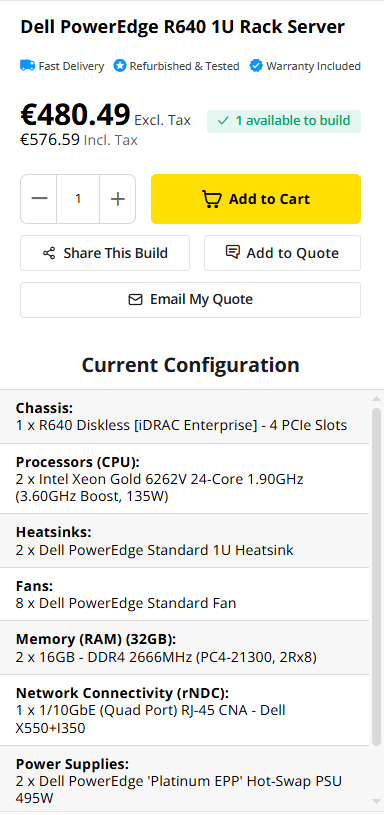
What makes this one a good starter pick: two 24-core Xeon Gold CPUs add up to 48 physical cores, and with simultaneous multithreading that's 96 threads on a single 1U server, comfortably enough for a first batch of VMs. iDRAC Enterprise is included in the build rather than sold as a separate license, which is the exact thing the warning above says to check for. The dual hot-swap power supplies and eight redundant fans mean no single component failure takes the server offline. All of it lands under €600 including tax, which fits comfortably inside a first platform's budget.
Check eBay for Individual Listings
eBay covers the same server families as bargainhardware, but as individual listings from many different sellers rather than one reseller's tested stock, which means more choice and more variation in condition. A business seller with hundreds of completed server sales and a stated return policy is worth paying slightly more for than a private listing with no history behind it and no photos beyond a stock image.
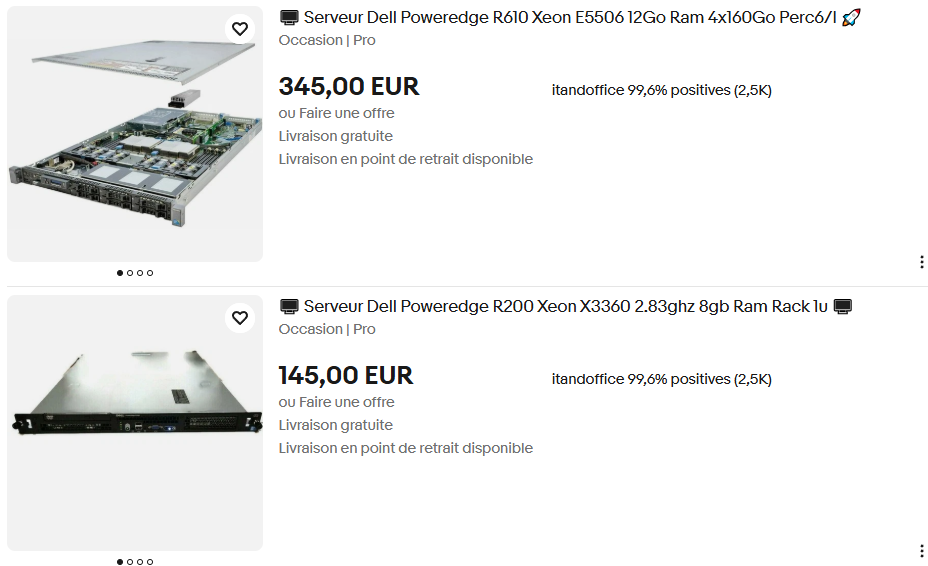
Neither of these is the machine to run a real customer's workload on, and that's fine at this price. The R610's Xeon E5506 and the R200's Xeon X3360 are both quad-core parts from before hyper-threading reached the Xeon line, so four threads is the ceiling on either one, a fraction of the 96 threads on the bargainhardware build above. What they're good for is learning on real rack hardware for less than the price of a night out: booting Proxmox for the first time, working through remote management, and running every step in this guide once before spending real money on something sized for actual VM density.
Don't older Dells like these still come with iDRAC for remote management?
Sometimes, but it isn't guaranteed on hardware this old, and neither listing here mentions it. The warning above still applies: ask the seller directly whether iDRAC is present and licensed before paying, rather than assuming it from the model name alone.
Brands like HPE ProLiant, Dell PowerEdge, and Supermicro dominate the used market for a reason: parts, firmware, and documentation for them stay easy to find years after the original buyer moved on, which matters the first time a drive needs replacing at 2 a.m.
In summary
- A rack server adds redundant power, ECC memory, and remote management that a home PC doesn't have.
- Running one at home means planning for fan noise and around 150W of continuous power draw.
- Thread count matters more than clock speed for hosting several VMs at once.
- Off-lease HPE, Dell, and Supermicro servers on eBay or bargainhardware.co.uk cost a fraction of new hardware with the same specs.
In the next section, you'll install Proxmox VE as the hypervisor that turns this hardware into a platform.