
A routed /29 contains eight IPv4 addresses, a /28 contains 16, and a /27 contains 32. The number available to your servers depends on how the block reaches them. A conventional public LAN reserves network and broadcast addresses and usually uses another address for its gateway. Individually routed /32 addresses can have different overhead.
If your server has room for more VMs but your host cannot supply enough IPv4 addresses, a routed service can bring those addresses to the hardware you already have. First size the allocation, then choose how to deliver it. The examples below show when a conventional subnet makes sense and when individual addresses through Taipan Transit fit the deployment.
Compare /29, /28, and /27 address capacity
The prefix length counts the network bits in a 32-bit IPv4 address. Each step from /29 to /28 to /27 doubles the block. RFC 4632 describes CIDR prefix notation and route aggregation.
| Prefix | Subnet mask | Total | LAN host addresses | Servers after one gateway |
|---|---|---|---|---|
| /29 | 255.255.255.248 | 8 | 6 | 5 |
| /28 | 255.255.255.240 | 16 | 14 | 13 |
| /27 | 255.255.255.224 | 32 | 30 | 29 |
The last two columns assume one conventional broadcast subnet, with network and broadcast addresses reserved. They exclude any extra provider reservations. They do not describe every routed service.
Understand what the provider routes
With a routed block, the provider sends packets for your prefix to a next hop: your server, router, or tunnel endpoint. Your gateway decides which internal host receives each packet. The link carrying the block can have its own separate addressing.
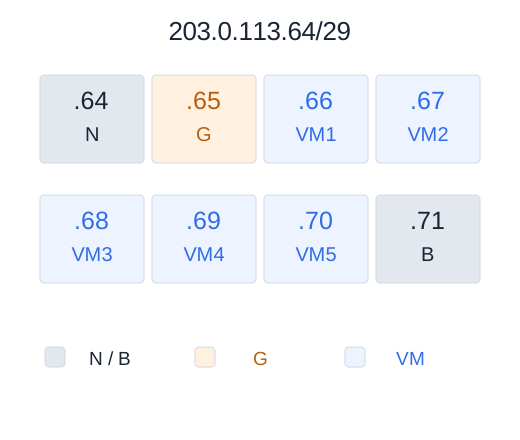
For example, 203.0.113.64/29 covers 203.0.113.64 through 203.0.113.71. If your gateway places that block on a public LAN, .64 identifies the network, .71 is broadcast, and .65 can serve as the gateway. That leaves .66 through .70 for five servers.
When all eight, 16, or 32 addresses may be usable
A provider-supported design can route individual /32 addresses to hosts over a separate transit network. If the aggregate is never configured as a broadcast subnet, its first and last addresses may also be usable as host addresses. This depends on the provider, operating systems, and routing design. Get explicit confirmation before counting every address as capacity.
Eight individual addresses are also not automatically a /29. A CIDR block must be contiguous and aligned: /29 blocks start at multiples of eight in the final octet, /28 blocks at multiples of 16, and /27 blocks at multiples of 32. A list of eight scattered /32 addresses needs individual routes.
Choose a block from your deployment plan

Count independent public endpoints, then add a specific growth allowance. Ten VMs with one IPv4 each fit in a conventional /28 with one gateway, leaving three server addresses available. If six more VMs are already planned, that layout needs a /27. Splitting a block across several public LANs consumes additional network, broadcast, and gateway addresses.
Several HTTPS sites can share an address through a reverse proxy. Services using different ports can also share an address through port forwarding when their protocols and clients allow it. Separate tenants, fixed-port conflicts, and independent outbound identities are stronger reasons to allocate separate IPv4 addresses. The homelab sizing guide explores the service inventory.
Compare the complete recurring cost: allocation, tunnel or transit fee, included traffic, overage, and any setup charge. Divide that total by the number of server addresses your chosen layout actually provides. A cheaper block can cost more per usable endpoint if its delivery model reserves additional addresses.
Confirm the delivery terms before ordering
- Allocation: a named contiguous prefix or a list of individual addresses, with all reservations documented.
- Transport: a route to your existing server address, or a GRE, IPsec, or WireGuard tunnel.
- Return path: the required next hop and whether source-based routing is necessary.
- Operations: reverse DNS control, traffic limits, filtering, address replacement, and what happens when you move the endpoint.
Ask your current host about a routed subnet first. A tunnel is useful when the host cannot supply enough addresses or when the destination is a home connection. WireGuard can initiate outbound through CGNAT; GRE requires support for IP protocol 47 along the path. See the GRE and WireGuard comparison.
Give existing VMs public IPv4 with Taipan Transit
Consider a dedicated server with ten VMs and enough CPU and RAM, but only one public IPv4 from its host. Taipan Transit can deliver additional public addresses through a tunnel to that server. The hypervisor or gateway forwards each address to its VM, so the compute can stay where it is.

This addresses a common reason for searching for a /28: ten VMs need ten public identities. If the application does not require a contiguous prefix, ten individually routed addresses can meet that need. Taipan handles the public announcement and filters incoming traffic before tunnel delivery; the customer configures guest routing and firewalls. The IPv4 service page explains this separation between compute and public addressing.
At the published rate of €0.70 per IPv4 per month, ten addresses represent €7 per month for the address component. Tunnel access is advertised from €2 per month during the current campaign; traffic charges and any applicable taxes must also be checked in the order. These rates were checked on September 16, 2026. This is an individual-address calculation, not a quote for a contiguous /28.
From address count to the first reachable VM
- Choose the delivery model. For individual public identities, start with the number of VMs that need them. For a required contiguous /29, /28, or /27, confirm availability and reserved addresses with Taipan support before ordering.
- Select a tunnel. WireGuard suits an outbound connection from a home lab or a server behind NAT. Check the network requirements before choosing GRE or IPsec.
- Bring one VM online. Follow the supplied tunnel configuration, route its assigned IPv4 to the VM, and verify inbound connections and the return path. Repeat for the remaining addresses.
Have the servers and the address count? Create a Taipan Transit account to configure a tunnel and order the IPv4 addresses your VMs need.
Route a /29 from a Linux gateway to a VM
This example uses the conventional LAN layout from the diagram. It assumes the provider already routes 203.0.113.64/29 through a working WireGuard interface named wg0. The gateway has a dedicated internal bridge named br-public, and the VM connects to it through eth0. All public IPs shown here are documentation values; replace them with your allocation.

Start with the provider's tunnel setup. The commands below are temporary Linux examples, not a full firewall or persistent network configuration. Use a console or separate management path while changing routing.
Give the gateway and VM their addresses
On the gateway, enable forwarding and assign the LAN gateway address. The bridge must already exist and be up.
sudo sysctl -w net.ipv4.ip_forward=1
sudo ip address add 203.0.113.65/29 dev br-public
Inside the VM, assign one host address and point its default route at the gateway:
sudo ip address add 203.0.113.66/29 dev eth0
sudo ip route replace default via 203.0.113.65 dev eth0
Do not assign 203.0.113.66 to the gateway as well. It belongs to the VM. Keep the public bridge separate from the household LAN and expose only the intended service ports.
Send the block's replies through the tunnel
On the gateway, a dedicated routing table sends traffic sourced from the block through WireGuard. First verify that table 100 and rule priority 10000 are unused. Include the connected public LAN route so traffic between hosts in the block stays local.
sudo ip route add 203.0.113.64/29 dev br-public table 100
sudo ip route add default dev wg0 table 100
sudo ip rule add priority 10000 from 203.0.113.64/29 lookup 100
The provider-side WireGuard peer must permit your assigned source prefix. The client-side peer must permit the Internet destinations carried through it; a single-provider setup commonly uses AllowedIPs = 0.0.0.0/0. When managing routes manually with wg-quick, Table = off prevents automatic route installation. Keep the provider endpoint reachable through the original uplink. Follow the supplied tunnel configuration if it already manages policy routing.
For /28 or /27, substitute the actual assigned prefix and recalculate the gateway and host range. Never expand a route beyond your allocation.
Apply firewall and reverse-path settings
Permit required new connections from wg0 to the intended VM ports in the forwarding chain, plus established return traffic. Allow the VM's intended outbound traffic through the tunnel. Preserve its public source address: a broad masquerade rule on the tunnel can replace it.
Strict reverse-path filtering can drop traffic arriving through a tunnel when the main table points back to its source through another uplink. Inspect rp_filter on both the tunnel and LAN interfaces, including the all setting. Linux documents loose mode (2) for asymmetric routing. Keep source validation in the firewall and limit each guest to its assigned address. See the kernel IP sysctl reference.
Test reachability in both directions
On the gateway, inspect the route that a forwarded reply from the VM would take:
ip rule show
ip route show table 100
ip route get 198.51.100.20 from 203.0.113.66 iif br-public
sudo wg show wg0
The route lookup should select wg0. Its destination is a documentation address used only to inspect route selection. Test real connectivity against an external host you control.
From another network, connect to a service listening on the VM's assigned public address. Then originate a connection from that VM and check the source recorded by the external server. Both directions must work before adding more guests.
| Symptom | First checks |
|---|---|
| Tunnel works, VM is unreachable | Provider route, forwarding policy, bridge address, VM listener, and VM firewall. |
| Requests arrive, replies disappear | VM default route, source policy rule, WireGuard AllowedIPs, and reverse-path filtering. |
| Outbound source is unexpected | Masquerade rules and the application's selected source address. |
| Small packets work, transfers stall | Tunnel MTU, required ICMP messages, and TCP MSS. |
The MTU and MSS reference covers encapsulation overhead. After successful tests, persist the addresses, forwarding setting, routes, and rules in your network manager or tunnel hooks, with matching cleanup on shutdown. Reboot during a maintenance window and repeat the external checks.
Plan for growth and shared failures
A larger block adds address capacity. Bandwidth, packet-processing capacity, and tunnel availability remain separate limits. All VMs using one gateway depend on that gateway and its uplink. A /27 does not provide redundancy by itself.
Ask whether expansion can preserve existing addresses. Moving from a /29 to a /28 requires the adjacent aligned space to be available; otherwise the provider may supply a separate block. Keep DNS records, reverse DNS, firewall objects, and tenant assignments documented so adding a second block is manageable.
Frequently asked questions
How many usable addresses are in a routed /29?
A /29 contains eight IPv4 addresses. A conventional broadcast subnet has six host addresses, or five for servers after assigning one to the gateway. A provider-supported /32 routing design may use all eight. Confirm the delivery model and reserved addresses before ordering.
What is the difference between a /28 and a /27?
A /28 contains 16 addresses and a /27 contains 32. On a conventional broadcast subnet they provide 14 and 30 host addresses, respectively. A gateway inside the block consumes one of those host addresses.
Does a routed subnet require an ASN or BGP?
A provider can announce a covering aggregate and route your smaller block to your server or tunnel using a static route. That arrangement does not require you to operate an ASN or a BGP session.
Can I use a routed IPv4 subnet behind CGNAT?
Yes, if the provider delivers it through a tunnel initiated from your network, such as WireGuard, and outbound UDP is allowed. Your gateway must forward traffic to the destination hosts and send replies back through the tunnel.
Are eight individual IPv4 addresses the same as a /29?
Only if they form the complete, correctly aligned contiguous block and the provider assigns it as such. Eight separately allocated addresses may be scattered across different prefixes. Route and configure only the addresses or prefix actually assigned to you.